Integration of APEX, ORDS, Tomcat, and Apache HTTP Server (APEXOTA)
About
For Oracle developers, APEX is definitely one of the most important platforms for web application development. Using PL/SQL as main programming language, Oracle developers, who usually do not have leading-edge knowledge of fast-changing web technologies, still able to create an attractive, user-friendly, data-driven web application in a fairly short time, with very limited resources.
The actual power of APEX is that it can integrate with other applications easily. For example, you have a PHP app, a Springboot app with Angular / React frontend, and some static web content. Now you want to add a new APEX app, or handling oracle database data through REST API. Rather than running each app in its silo, you can put all apps in one single system -- Apache HTTP server in the front, then Tomcat, serving data through ORDS and APEX, and Oracle database as backend. The stability, scalability, and versatility of each component can produce synergetic power for any company needs.
Part 1: Preparation
The following instructions can be applied in Windows or Linux OS. For demonstration purpose this setup is applied to a Windows 11 environment.
Create two folders
C:\Download- You put all downloaded components in this folder.C:\APEXTA- All technical stacks will be installed under this folder.
Note
The versions of all components are constantly changing. I use the latest versions as of the time when I write these instructions. They could have newer versions now.
Download Required Components
Put all download files to
C:\Download
Oracle AI Database 26ai for Windows x64
Download the fie
oracle-ai-database-free-26ai-23.26.0.windows.x64.zip.Unzip it to a new folder
C:\Download\26ai.
Oracle APEX 24.2 - All languages
Unzip the file to
C:\APEXOTA. It will create theapexfolder under it.
Oracle REST Data Services 25.4
https://www.oracle.com/database/technologies/appdev/rest-data-services-downloads.html
Download the file
ords-25.4.0.364.1739.zip. Create a new folderC:\APEXOTA\ordsand unzip the archive to it.
Apache Tomcat 9.0.113 64-bit Windows
Download the
64-bit Windows zipdistribution. Unzip the file toC:\APEXOTA. It will create folderapache-tomcat-9.0.xxunder it. Rename this folder totomcat9.
Apache HTTP Server 2.4.66-260107 Win64
https://www.apachelounge.com httpd-2.4.66-260107-Win64-VS18.zip
Unzip the file to
C:\APEXOTA. It will create a folderApache24under it. Rename the folder to lowercase.Install Visual C++ Redistributable for Visual Studio 2017-2026 (runtime library for HTTP Server)
OpenJDK JRE 21 Windows x86 64-bit (zip)
https://adoptium.net/temurin/releases/?version=21&os=windows&mode=filter&arch=x64
Download the JRE file
OpenJDK21U-jre_x64_windows_hotspot_21.0.9_10.zipand unzip it toC:\APEXOTA. Rename the folder tojre21.
Summary
7 files are downloaded and unarchived:
Oracle database 26ai free edition
Oracle APEX 24.2
Oracle ORDS 25.2
Apache Tomcat 9
Apache HTTP Server 2.4
Microsoft VC18 runtime libraries
Java 21 JRE
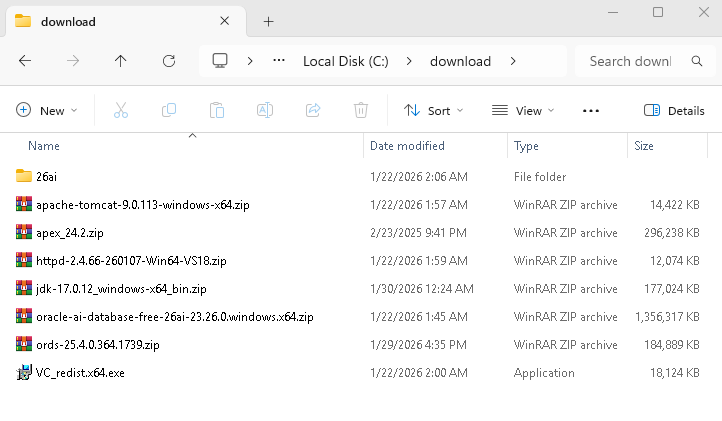
Directory structure
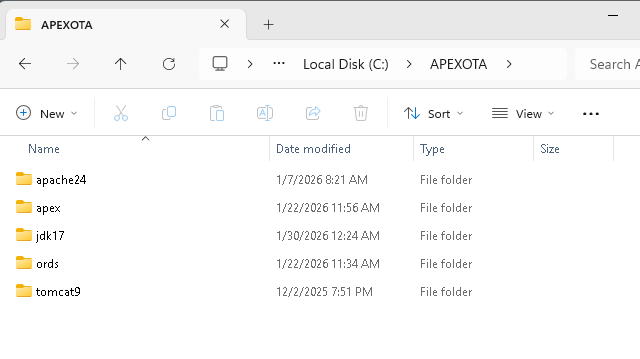
Archives are unzipped to folder C:\APEXOTA:
| Next |
| Home | Repositories | Blog |
© 2026 by Christopher Ho. All Rights Reserved