Oracle E-Business Suite 12.2.15 Installation on Windows
PART 2 ‐ EBS 12.2.0 INSTALLATION
Installation
Note
In this walkthrough, the VM hostname is demo.symbolthree.com, and instance name is TST.
Default passwords are used:
Database:
apps/apps,system/managerWeblogic Server:
weblogic/Welcome1
Open Powershell and run
Set-ExecutionPolicy -ExecutionPolicy RemoteSignedNow you can run start the installation
cd D:\STAGE\startCD\Disk1\rapidwizrapidwiz.cmd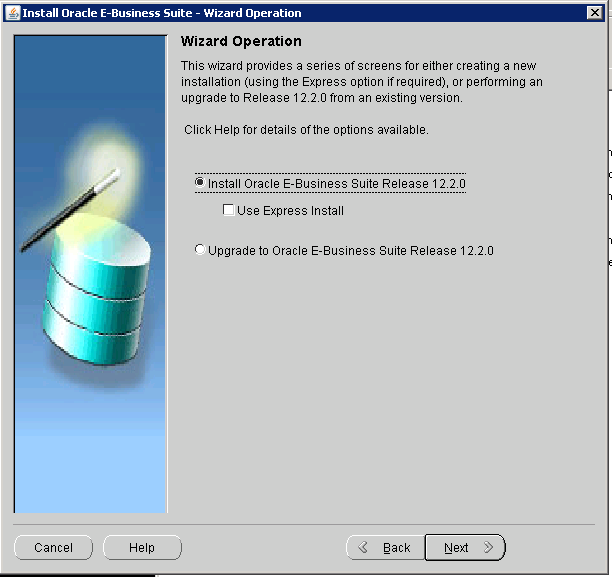
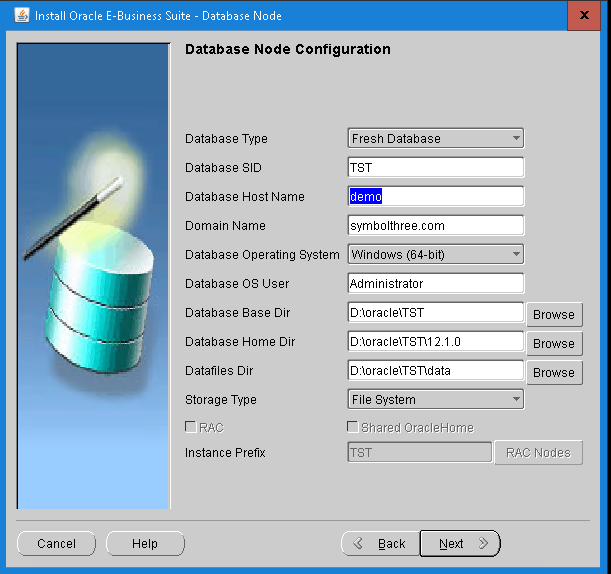
Database Node Configuration
Database Type = Fresh Database
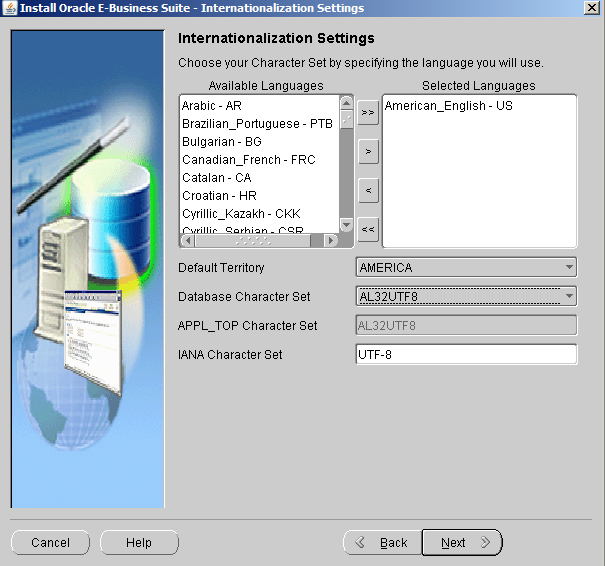
Internationalization setting
Database character set = AL32UTF8
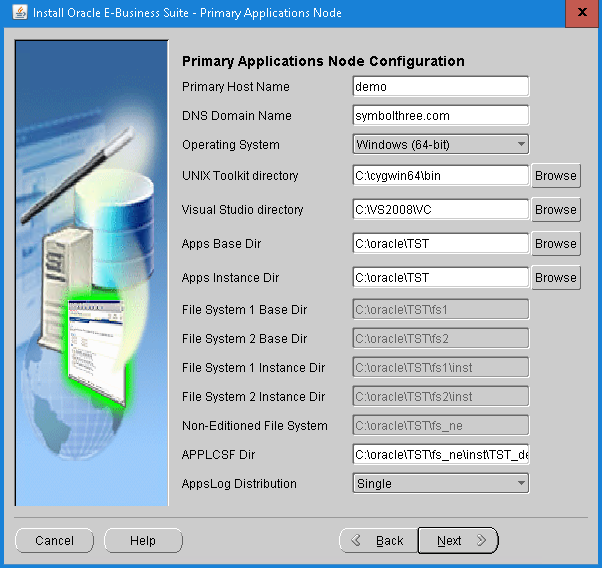
Primary Application Nodes Configuration
UNIX Toolkit directory =
C:\cygwin64\binVisual Studio directory =
C:\VS2008\VC
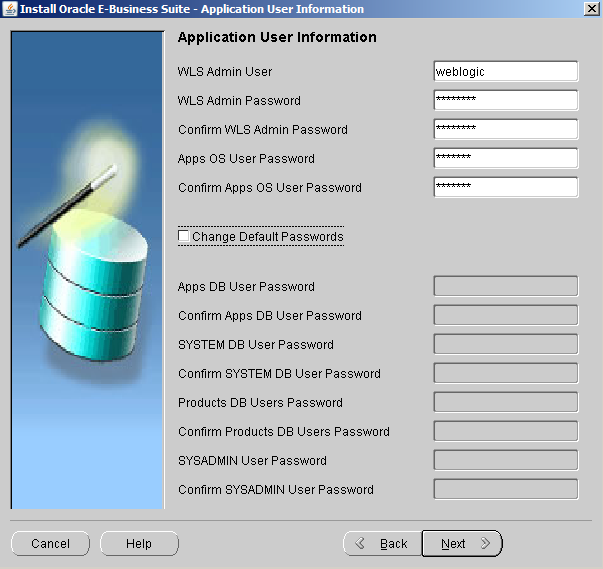
Application User Information
WLS Admin Password =
Welcome1Apps OS User Password = password of Windows user
Administrator
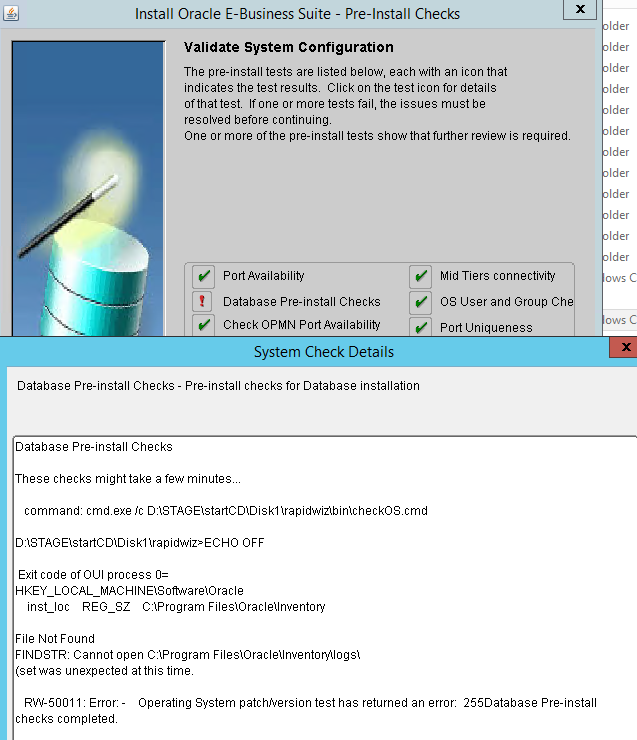
Validation System Configuration
Manually restart Windows Service
ServerIgnore the error
Database Pre-install Checks(or you can retry the validation and you will see all checks are passed)
Continue the installation process, and it runs ~2hr to finish.
Post-Installation
Warning
Unlike typical EBS 12.2 production systems, this instance use SINGLE FILE SYSTEM, rather then dual filesystem. All patches are applied in either hotpatch or downtime mode. Patches are applied directly to the RUN filesystem. We don't do the fs_clone at all.
Shutdown all app server services
Start the fs1 profile:
C:\oracle\TST\fs1\EBSapps\appl\envshellTST_demo.cmdRun
%ADMIN_SCRIPTS_HOME%\adstpall.cmd
xxxxxxxxxxC:\oracle\TST\fs1\inst\apps\TST_demo\admin\scripts>adstpall.cmdECHO is off.ECHO is off.Sat 10/24/2015 05:54 PMECHO is off.ECHO is off.Enter the APPS Username/Password: apps/appsEnter the WebLogic Admin password: Welcome1...Apply Consolidated Seed Table Upgrade Patch
Copy unzip patch
26787701to%PATCH_TOP%Run
%ADMIN_SCRIPTS_HOME%\adadminsrvctl.cmd startto start up Node Manager and Weblogic server.Apply the patach in hotpatch mode
adop phase=apply patches=26787701 hotpatch=yes
Update Database to version 12.1.0.2.220719 (33883271)
Change the db init file
C:\oracle\TST\12.1.0\database\initTST.oraxxxxxxxxxx#optimizer_adaptive_features = FALSE #MP <-- comment out this lineoptimizer_adaptive_plans=false_disable_actualization_for_grant=trueUnzip the latest OPatch 6880880
p6880880_121010_MSWIN-x86-64.zipto%ORACLE_HOME%(C:\oracle\TST\12.1.0)set
PATH=%ORACLE_HOME%\OPatch;%PATH%run
opatch rollback -id 20476776Shutdown the database
net stop vmtools (if using VMWare)
net stop COMSysApp
net stop MSDTC
Unzip patch
p33883271_121020_MSWIN-x86-64.zip, and apply opatchxD:\patch\p33883271_121020_MSWIN-x86-64\33883271>opatch applyOracle Interim Patch Installer version 12.2.0.1.47Copyright (c) 2015, Oracle Corporation. All rights reserved.Oracle Home : C:\oracle\TST\12.1.0Central Inventory : C:\Program Files\Oracle\Inventoryfrom :OPatch version : 12.2.0.1.47OUI version : 12.1.0.2.0Log file location : C:\oracle\TST\12.1.0\cfgtoollogs\opatch\opatch2015-10-24_18-56-31PM_1.logVerifying environment and performing prerequisite checks...OPatch continues with these patches: 33883271Do you want to proceed? [y|n]yUser Responded with: YAll checks passed.Please shutdown Oracle instances running out of this ORACLE_HOME on the local system.(Oracle Home = 'C:\oracle\TST\12.1.0')Is the local system ready for patching? [y|n]YUser Responded with: Y...Patching component oracle.rdbms.deconfig, 12.1.0.2.0...Patching component oracle.ordim.client, 12.1.0.2.0...Patch 33883271 successfully applied.Sub-set patch [21551086] has become inactive due to the application of a super-set patch [33883271].Sub-set patch [18966843] has become inactive due to the application of a super-set patch [33883271].Sub-set patch [20123899] has become inactive due to the application of a super-set patch [33883271].Please refer to Doc ID 2161861.1 for any possible further required actions.Log file location: C:\oracle\TST\12.1.0\cfgtoollogs\opatch\opatch2015-10-24_18-56-31PM_1.logOPatch succeeded.
Startup the database, and finish this patch by applying the datapatch
xxxxxxxxxxset ORACLE_SID=TSTdatapatch -verboseAt this point, you have a EBS 12.2.0 instance running on 12.1 database with latest patch, in Windows 2008 Server. You can start up all services, but the Form can be opened by the Internet Explorer in this OS.
| Table of Content | Next |
| Home | Repositories | Blog |
© 2026 by Christopher Ho. All Rights Reserved