Oracle Fusion Applications 11.1.9.2.0 Installation
1. Preparation ‐ Part A
A. Topology and Nodes
All nodes are installed in virtual machines. Broadcom VMware Workstation is used in this setup, but you can use Microsoft Hyper-V, or Oracle VirtualBox.
The setup described in here is the minimum and simplest physical requirement to make the Fusion Applications running with an acceptable performance and functional.
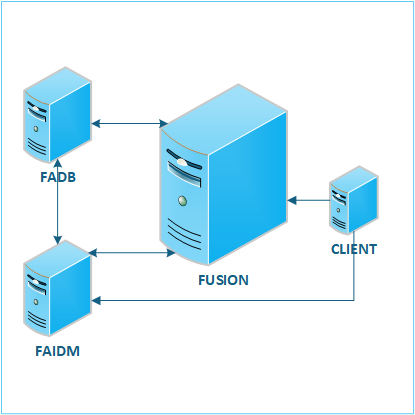
4 Nodes are used:
FADB - The Oracle 11gR2 database. It hosts the data for both IDM and Fusion.
FAIDM - The Identity Manager Server. All IDM components are in this node.
FUSION -The Application Server which contains all Fusion components
CLIENT - This is a client box which is used to perform Fusion Applications task with web browser, ADFDI (Excel), and other client programs.
| NODE | Operating System | Hard Disk (Gb) | Memory (Gb) |
|---|---|---|---|
| FADB | Windows Server 2008 R2 x64 | 100 | 10 |
| FAIDM | CentOS 5.11 | 50 | 8 |
| FUSION | CentOS 5.11 | 200 | 64 |
| CLIENT | Windows 7 SP1 x64 | 50 | 2 |
Important
Fusion Applications 11.1.9 was released in 2014. We need to prepare the technical environment for that time, and should not use the standard for year 2025. So, the Operating Systems, JDK, browser, even the SYSTEM CLOCK, we need to set them to 10 years ago. It's because the certificates provided in the package have ALL EXPIRED already. Without changing the clock the server will not able to startup due to invalid certificate errors.
| Table of Content | Next |
| Home | Repositories | Blog |
© 2026 by Christopher Ho. All Rights Reserved