Integrate Oracle E-Business Suite Release 12.2 With Oracle APEX
APEX2EBS - Part 7
Create a New APEX2EBS Page
It is not recommanded to create new pages under the
APEX2EBSapp. It's because this app will be updated in future releases that will erase the new custom pages. The proper way of developing new APEX2EBS page should be:Import the template application (
8-APEX2EBS-TEMPLATE.SQL).The default app name is called A2E-TEMPLATE. Change the name to "GL", "AP", or anything which reflects the purpose of this app. For demo purpose, in here the application name is changed to "Payables"
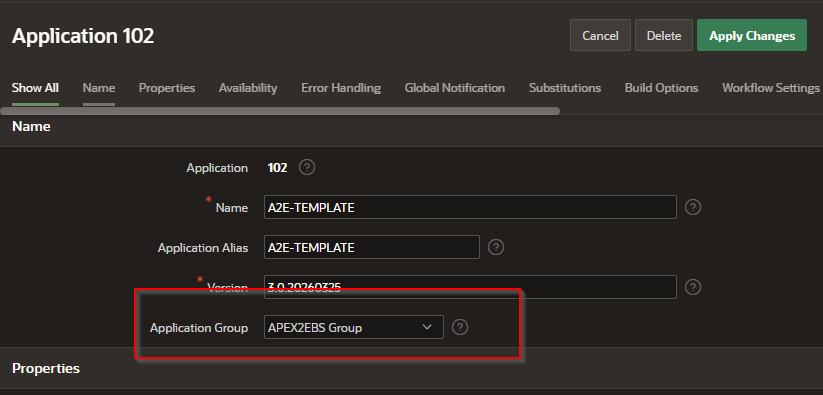
Make sure the application group is A2E Application. Only the pages or page groups within this Application Group can be used in APEX2EBS.
The page number of any new custom page MUST BE LARGER THAN 300. Page number < 300 is reserved for core and admin use.
The template app contains some sample pages (Page number > 300). These pages are safe to delete.
If the
APEX_TO_EBSdatabase link uses the EBS custom schema, for a new APEX page development:Create a coresponding view in EBS, owner by APPS
create view A2E_AP_INVOICES AS SELECT ...
Grant the Select privilege of this view to the custom schema
grant select on APPS.A2E_AP_INVOICES TO XXAPEX
Under custom schema, create a synonym of this view (to remove the
apps.prefix)create synonym XXAPEX.A2E_AP_INVOICES for APPS.A2E_AP_INVOICES
In the APEX page, the SQL will become
select * from A2E_AP_INVOICES@APEX_TO_EBS
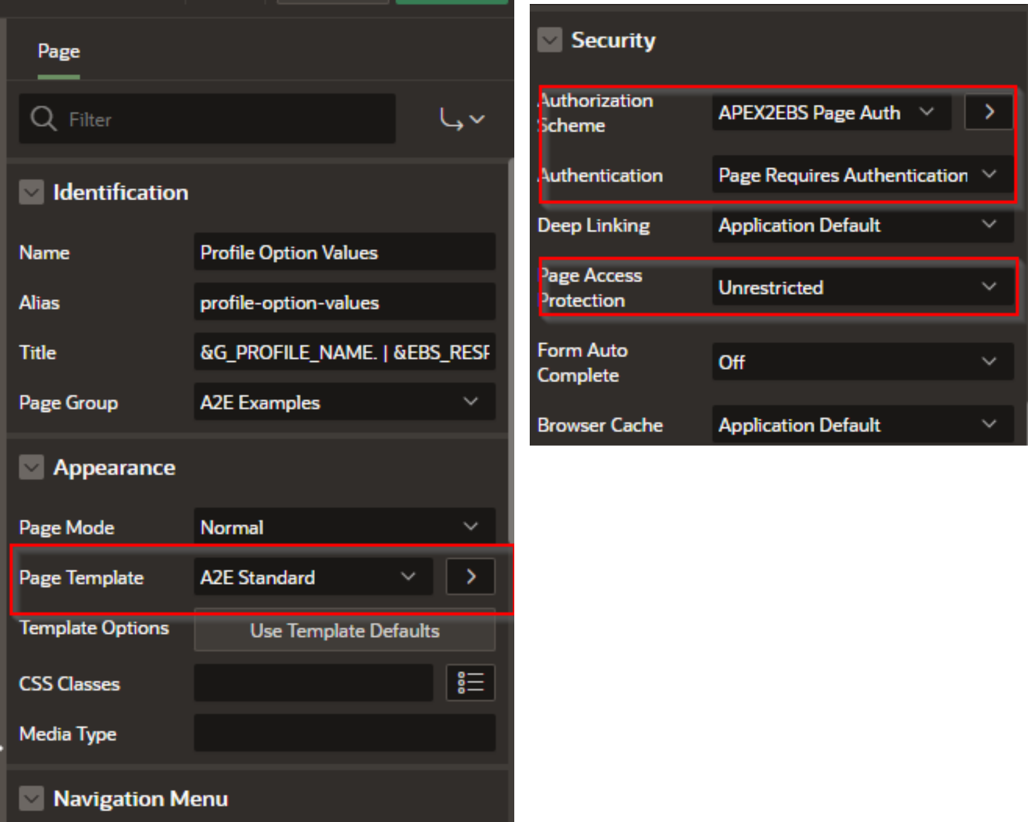
For APEX2EBS framework, the page must use these settings:
Page Template = A2E Standard
Authorization Schema = APEX2EBS Authorization
Page Access Protection = Unrestricted
These Application Items are available to use in the code.
| Application Item | Meaning |
|---|---|
| EBS_LANG | Language code in current session. |
| EBS_ORG_ID | ORG_ID, as defined by profile option at that resp. |
| EBS_RESP_APP_ID | Responsibility App ID |
| EBS_RESP_ID | Responsiibility ID |
| EBS_RESP_NAME | Responsiiblity Name (in EBS_LANG code) |
| EBS_USER_ID | Current user ID |
| APP_USER | Current User Name |
| Table of Content | Next |
| Home | Repositories | Blog |
© 2026 by Christopher Ho. All Rights Reserved