Oracle E-Business Suite 12.2.15 Installation on Windows
PART 5 ‐ Upgrade to WINDOWS SERVER 2012, EBS 12.2.10
Upgrade Windows
Windows server upgrade is a pretty straight forward and error-free process. Mount the
Windows Server 2012 StandardISO image and run the setup in Windows 2008 GUI. During installation, make sure:Select
Windows Server 2012 R2 Standard (Serve with a GUI)Select
Upgrade: Install Windows and keep files...
After the upgrade is done, restart all Oracle processes to ensure the EBS instance is working as before.
Visual Studio 2017
Uninstall Visual Studio 2008 Express Edition
Run Windows Update to get the latest dotNet runtime libraries. It is required by the Visual Studio Installer.
Download Visual Studio Community Edition Installer from
https://aka.ms/vs/15/release/vs_community.exeSelect
Desktop development with C++, and select the features as shown. Change install location toC:\VS2017.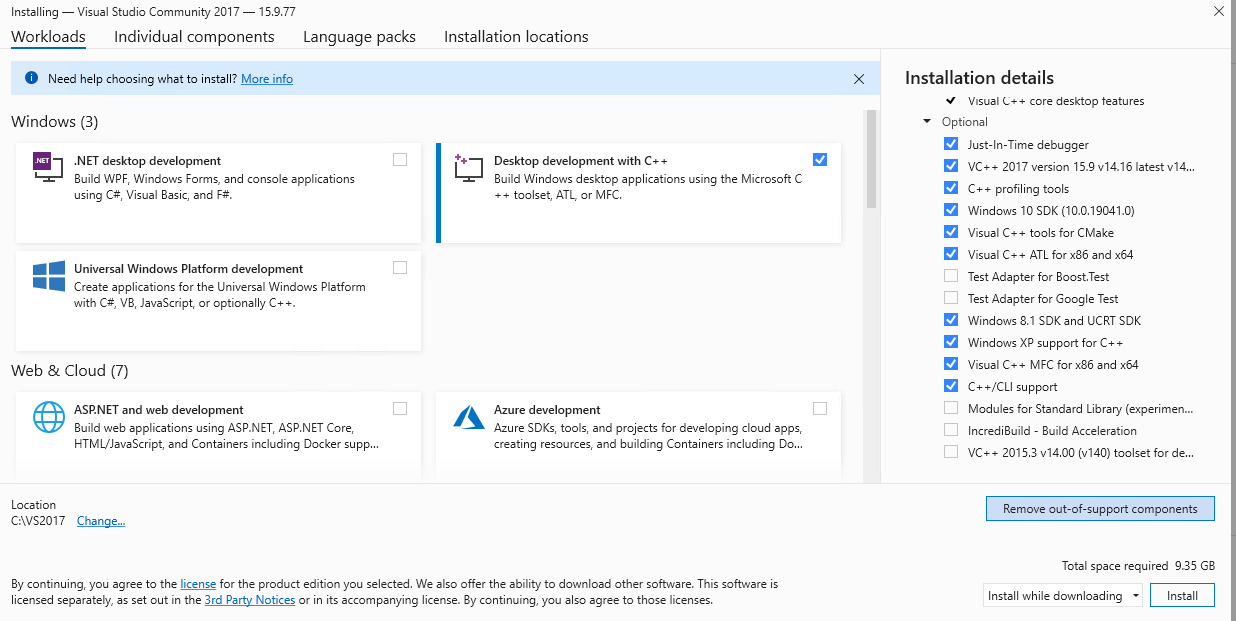
Selected components will be downloaded from Internet and then installation will kick off.
After the installation is done, edit the context file
%CONTEXT_FILE%to change the system variables_MSDEVdirvalue:xxxxxxxxxxfrom<msdevdir oa_var="s_MSDEVdir" osd="NT">C:\VS2008\VC</msdevdir>to<msdevdir oa_var="s_MSDEVdir" osd="NT">C:\VS2017\VC</msdevdir>Run
%ADMIN_SCRIPTS_HOME%\adautocfg.cmdto update context variables.Now the profile is updated. Open a new prompt and set the variable
SET MSVCPP=C:/VS2017/VC/Tools/MSVC/14.16.27023
Run
%ADMIN_SCRIPTS_HOME%\adadminsrvctl.cmd startApply these patches one by one for VS 2017 and VS 2019 compatibility.
*32061884: CHANGES IN TEMPLATES TO SUPPORT VS2019 ON WIN 2012 R2
**32061960: CHANGES TO SUPPORT VS2019 FOR AD ON WINDOWS
27881214: CHANGES REQUIRED IN CZNUM.LC TO SUPPORT VS2017 ON WIN 2012 R2
29441529: CHANGES REQUIRED TO SUPPORT VS2017 ON WIN 2012 R2
*31122439: TEMPLATES TO SUPPORT VS2017 ON WIN 2012 R2
32062000: CHANGES REQUIRED TO SUPPORT VS2019 ON WIN 2012 R2
33087758: AUTOCONFIG/RAPID CLONE SUPPORT FOR WINDOWS SERVER 2019, 2016, 2012 R2
*included in R12.TXK.C.DELTA.17, **included in R12.AD.C.DELTA.17
adop phase=apply patches=32062000 hotpatch=yesadop phase=apply patches=29441529 hotpatch=yesadop phase=apply patches=27881214 hotpatch=yesadop phase=apply patches=33087758 hotpatch=yes
Unzip patch
32991045and run thecleanup122.cmdxxxxxxxxxxD:\patch\32991045>cleanup122.cmdEnter the APPS Username: appsEnter the APPS Password: ****Enter database SID: TSTEnter RUN APPL_TOP: C:\oracle\TST\fs1\EBSapps\applECHO is off.ECHO is off.Tue 10/28/2025 11:26 AMECHO is off.ECHO is off.APPSORA.cmd exiting with status 0De-licensing products MSC MSO MSR WPS FLMExecuting cleanup on RUN FS....Removing ilog libraries.No ILog 6.9 Library files present....Run
%ADMIN_SCRIPTS_HOME%\adadminsrvctl.cmd stopCopy file
msvcr71.dllto%ORACLE_HOME%\BINRun
adadamin->Maintain Applications Files and Registry menu->Relink Applications programs
Oracle E-Business Suite Release 12.2.10
Unzip patch
30399999(all files) and33678475to%PATCH_TOP%. Then apply both patches using merge and downtime mode:adop phase=apply apply_mode=downtime patches=30399999,33678475 merge=yesIf you encounter error about relinking
PONAO.dll, we can edit the patch driver fileu30399999.drv, and remove the linelink pon bin PONAO.dllReapply the patch by
adop phase=apply apply_mode=downtime patches=30399999,33678475 merge=yes abondon=yes
If you see error of Inventory Item Location flexfield compilation
Start up the app server services, select this flexfield and compile it manually. Then stop all services.
Restart the adop process by
adop phase=apply apply_mode=downtime patches=30399999,33678475 merge=yes restart=yes
If you encounter this error:
xxxxxxxxxxThe following Oracle Forms objects did not generate successfully:csi forms/US CSISYDCS.fmxTo just get around this issue (and we hardly have a chance to use this form), just replace it with a valid form:
xxxxxxxxxxmv %AU_TOP%\forms\US\CSISYDCS.fmb %AU_TOP%\forms\US\CSISYDCS.fmb~copy %AU_TOP%\forms\US\CSIIRTYP.fmb %AU_TOP%\forms\US\CSISYDCS.fmbThen run continue the adop process by
adop phase=apply apply_mode=downtime patches=30399999,33678475 merge=yes restart=yesAfter it's done, run
adop phase=cleanupPHASE B is completed. You can make a backup of the whole OS (VM files).
| Table of Content | Next |
| Home | Repositories | Blog |
© 2026 by Christopher Ho. All Rights Reserved