Oracle Fusion Applications 11.1.9.2.0 Installation
2. VMWare Virtual Machines
Create Virtual Machines
Create 4 VMs according to these specifications:
| Hostname | Operating System | Hard Disk (gb) | Memory (gb) |
|---|---|---|---|
| FADB | Windows Server 2008 R2 x64 | 100 | 10 |
| FAIDM | CentOS 5.11 | 50 + 50 (stage) | 8 |
| FUSION | CentOS 5.11 | 200 | 64 |
| CLIENT | Windows 7 SP1 x64 | 50 | 2 |
Note
For FAIDM, we create 2 virtual hard drives, one of this OS, one to store the staging files. This staging volume will be unmounted from FAIDM after IDM installation. Then, it is mounted to FUSION during FA installation.
Important
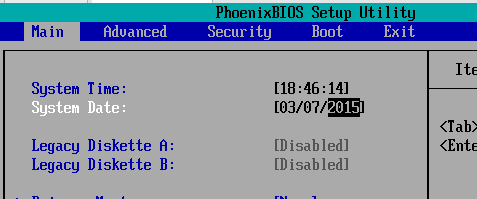
All virtual machines must set the system clock 10 years before your current time.
Set the system clock by booting the VM to BIOS (
power on to firmware), and change theSystem Dateto year 2015.
In the VMX file for all virtual machines, all the time synchronization parameters must set to
FALSE.
tools.syncTime = "FALSE"time.synchronize.continue = "FALSE"time.synchronize.restore = "FALSE"time.synchronize.resume.disk = "FALSE"time.synchronize.shrink = "FALSE"time.synchronize.tools.startup = "FALSE"
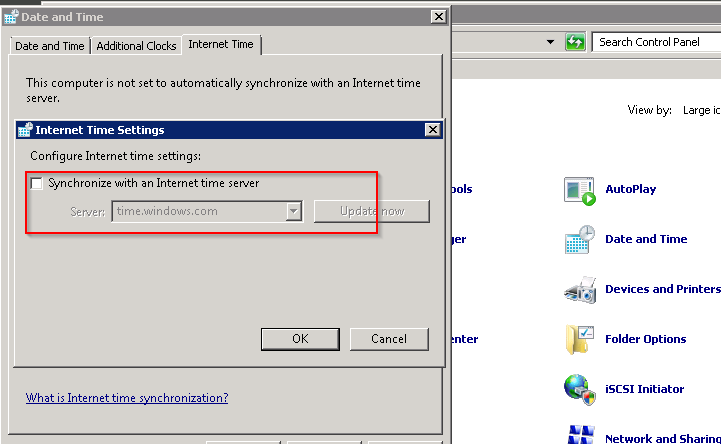
For Windows OS (
FADB,CLIENT), turn off theSynchronize with Internet time server.
For Linux OS (
FAIDM,FUSION), turn off thentpservice:
xxxxxxxxxxservice ntpd stopchkconfig ntpd offrm /etc/ntp.conf
Linux Installation
Since CentOS Linux was murdered by Redhat and IBM, you can only download the ISO image from alternative channels. One of the most reliable sites is from Internet Archive
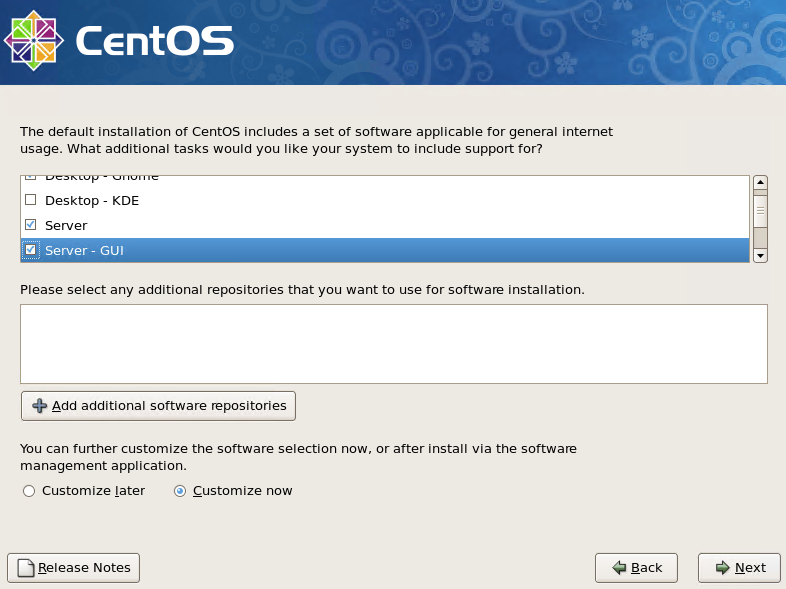
archive.org: https://archive.org/details/linux-centos-5.11-x86-64Install the OS with
Server - GUIoptions. Take all the default settings
Turn off
SELinuxandFirewallduring installation.
Staging Folder
The virtual machine
FAIDMhave 2 hard drives, one for the CentOS, and one is for staging files.After this OS is ready, transfer the FA media files downloaded from eDelivery to a temp folder in the OS drive
format and mount the other hard drive
Create a folder called
STAGEand unzip all the files to this mount point:
xxxxxxxxxxmkdir mnt/STAGEmount /dev/sdb1 /mnt/STAGEcd /tmp/archivesunzip -q -o V74516-01.zip -d /mnt/STAGEunzip -q -o V74517-01.zip -d /mnt/STAGEunzip -q -o V74518-01.zip -d /mnt/STAGEunzip -q -o V74519-01.zip -d /mnt/STAGEunzip -q -o V74520-01.zip -d /mnt/STAGEunzip -q -o V74521-01.zip -d /mnt/STAGEunzip -q -o V74522-01.zip -d /mnt/STAGEunzip -q -o V74523-01.zip -d /mnt/STAGEunzip -q -o V74524-01.zip -d /mnt/STAGEunzip -q -o V74525-01.zip -d /mnt/STAGEunzip -q -o V74526-01.zip -d /mnt/STAGEunzip -q -o V74527-01.zip -d /mnt/STAGEunzip -q -o V74528-01.zip -d /mnt/STAGEunzip -q -o V74530-01.zip -d /mnt/STAGEunzip -q -o V74531-01.zip -d /mnt/STAGEunzip -q -o V74532-01.zip -d /mnt/STAGEunzip -q -o V74533-01.zip -d /mnt/STAGE
Then you should see a new folder
/mnt/STAGE/installers/, and all FA files are under it. This folder will be represented as<STAGE>in the rest of the document.
| Table of Content | Next |
| Home | Repositories | Blog |
© 2026 by Christopher Ho. All Rights Reserved