3. IDM Installation ‐ Part 1
After setting up the database schemas for IDM, we can then create the IDM application. But First, we need to prepare the provisioning program, then setting all parameters, and finally running the actual provisioning.
Important
Create a root folder called oracle, and give its ownership to user oracle. Then put JDK6 under this folder. All IDM software components are installed under this folder.
xxxxxxxxxx(as root)mkdir /oraclechown oracle:oracle /oraclesu - oracleunzip <stage>/installers/jdk/jdk6 /oracle
Webgate libraries
It is required to put these files to
<STAGE>/installers/webgateexplicitly:
xxxxxxxxxxlibgcc_s.so.1libstdc++.so.5libstdc++.so.6
In the local lib64 folder, you can find the symbolic link of these files, and make a copy to the
webgatefolder:
xxxxxxxxxxcp /lib64/libgcc_s-4.1.2-20080825.so.1 <stage>/installers/webgate/libgcc_s.so.1cp /usr/lib64/libstdc++.so.5.0.7 <stage>/installers/webgate/libstdc++.so.5cp /usr/lib64/libstdc++.so.6.0.8 <stage>/installers/webgate/libstdc++.so.6
redhat-release content
Change content of
/etc/redhat-releasetoRed Hat Enterprise Linux Server release 5.11 (Final)
install RPM
Run as root, install these RPM (they are not available in CentOS):
xxxxxxxxxxrpm -Uvh libaio-devel-0.3.106-5.x86_64.rpmrpm -Uvh sysstat-7.0.2-13.el5.x86_64.rpm
Now all prereq are set, and we can start the provisioning now.
Install IDM Provisioning Wizard
The provisioning program is called
Identity Management Lifecycle Management(IDM LCM), and it is under folderinstallers/idmlcm.
xxxxxxxxxxsu - oraclecd <stage>/installers/idmlcm/idmlcm/Disk1/./runInstaller -jreLoc /oracle/jdk6 &
You will be prompted to create Oracle Inventory, just follow the instructions. The Wizard will restart again.
In the pre-requisite check, it will ensure these packages are installed in the OS:
xxxxxxxxxxbinutils-2.17.50.0.6compat-libstdc++-33-3.2.3-x86_64compat-libstdc++-33-3.2.3-i386elfutils-libelf-0.125elfutils-libelf-devel-0.125gcc-4.1.1gcc-c++-4.1.1glibc-2.5-12-x86_64glibc-2.5-12-i686glibc-common-2.5glibc-devel-2.5-x86_64glibc-devel-2.5-12-i386libaio-0.3.106-x86_64libaio-0.3.106-i386libaio-devel-0.3.106libgcc-4.1.1-x86_64libgcc-4.1.1-i386libstdc++-4.1.1-x86_64libstdc++-4.1.1-i386libstdc++-devel-4.1.1make-3.81sysstat-7.0.0
Install the LCM files under
/oracle/idm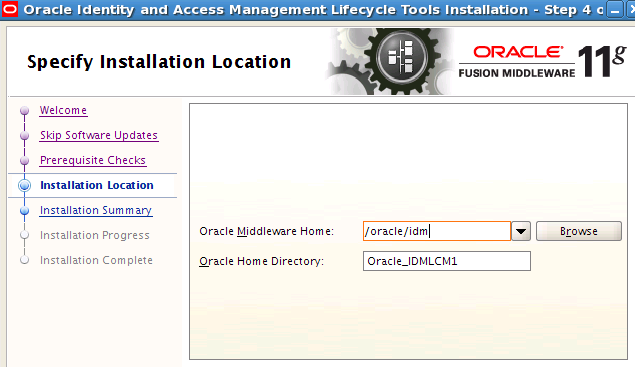
Finish the installation. A new folder is created
/oracle/idm/Oracle_IDMLCM1.
| Table of Content | Next |
| Home | Repositories | Blog |
© 2026 by Christopher Ho. All Rights Reserved